Traceflat / Floor plan from a photo
GUIDE · PLAN FROM A PHOTO
Turn a photo of a floor plan into a drawing you can edit.
Take a photo of a printed plan, scan it or screenshot it from a listing. Upload it and the AI draws the rooms, walls, doors and windows at the sizes written on it, in a few minutes. Then change it by hand or in plain words, see it in 3D and export it.
The editor and the sample run are free, no sign-up. New accounts get 5 free credits for 1 month. After that, AI runs on one-time credit packs, no subscription.
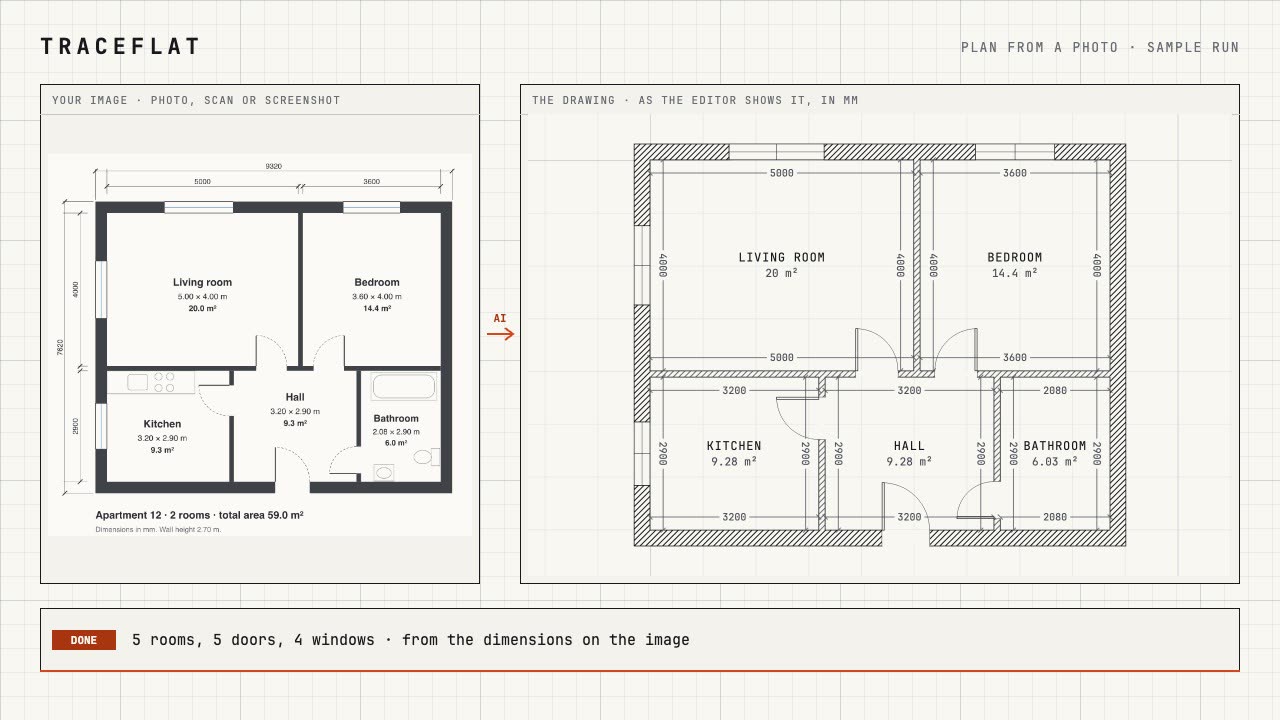
What the AI reads from the image
- Rooms at their inner sizes, from the dimension lines and the areas written on the plan.
- Walls with their real thickness: outer walls and partitions are measured separately.
- Doors and windows: which way a door opens and where it hinges, window widths and sills, balcony and loggia slabs.
- Room names and areas as written on the plan, in any language.
- What it cannot read for sure it works out from an area, the chain of dimensions or the proportions, and its reply names those places so you can check them.
Which images work
- A photo of a printed plan, shot straight on and in focus; a scan; a screenshot of a listing or of a PDF page.
- A hand sketch, if the sizes are written on it.
- Up to two images per plan: the whole plan, and a close-up of the part with small numbers.
- An image file (JPG, PNG and the like). For a PDF, take a screenshot of the page.
- Not a floor plan: a photo of a room, a 3D render or a picture of the house cannot be turned into a plan.
How it works
-
01
Open the planner
In your browser, on a computer. Nothing to install; the editor is free.
-
02
Plan from a photo
Choose the image and add a note if you like ("the balcony is glazed"). The AI draws it in a few minutes; you can close the page meanwhile.
-
03
Check it and go on
Compare it with your plan and fix what it could not read, by hand or in words ("the bathroom door opens outward"). Then furnish it, see it in 3D, export it.
After the drawing
- Exact editing: walls by their faces, dimensions in millimetres, centimetres, metres or feet and inches, snapping, undo.
- Changes in plain words: "make the kitchen 4 × 3", "remove the wall between the kitchen and the living room", "furnish the bedroom". See design a layout with AI.
- 3D in one click: the same plan as a 3D model. See floor plan in 3D.
- Export: PNG and the project file for free; PDF and DXF for AutoCAD with a pack. See floor plan to DXF.
What it costs
A plan from a photo costs 10 credits, a typed change 1 credit. New accounts get 5 free credits for 1 month. Credits come in one-time packs, no subscription: see pricing. A run that fails on our side costs nothing, and drawing by hand is always free.
Questions
How exact is a floor plan drawn from a photo?
It takes the sizes written on the plan, so on a clear plan the rooms come out to the millimetre. Sizes it had to work out are named in its reply: check those places. The result is a drawing to work with, not a surveyed measurement.
What if my floor plan has no dimensions?
It still draws it: it scales the plan from typical sizes (an entrance door, a bathtub) and the proportions of the image, and says so. Change one known length and fix the rest by hand or in words.
Can I draw the floor plan myself instead?
Yes. The drafting editor is free: draw walls by their length, add doors and windows, and the rooms and their areas appear by themselves.
Do I need to install anything?
No. It runs in Chrome, Edge, Firefox or Safari on a computer.
What happens to my photo?
It is used only to draw your plan, sent only to AI providers that neither store it nor train on it, and deleted after 30 days. See the privacy policy.